
本文章內容基於UnrealEngine5.1版本
最近在看5.0新導入的MassFramework,看到裡面出現了FInstanceStruct這個詞引起了我的興趣。基本上這東西可以讓我們動態選擇struct,而在Unreal中是把這種組裝用的property稱為Fragment。這個概念我第一次看到是在Unreal官方釋出的Lyra範例專案中看到,只是當時實驗了一下,由於他是使用UObject搭上reflection macro來實現,我沒辦法把一個UObject直接放進DataTable的Row中做編輯。這帶來的結果,就是當我在製作Plugin的時候,若需要用到DataTable時,必須要預先預想好所有使用者可能會想要有的欄位:哪些要直接放到TableRow中、哪些要指向外部的asset讓使用者自己在自己定義的BP或DataAsset中擴充。然而,可以想像的到,多了一個uasset就代表編輯的時候要另外開檔案,這對企畫人員非常的不友善,而且檔案一多,在維護上也會有不小壓力。這次看到了FInstanceStruct,馬上直覺想到這東西或許可以解決這個困擾我很久的問題。稍微實驗了一下,馬上驗證了上面提到的問題可以靠FInstanceStruct的機制來解決,因此決定花一點時間整理二種方法的優缺點。
接著,讓我們來看看這二種方法個別怎麼實現吧。
使用InstanceStruct製作Fragment的例子
InstanceStruct是定義在StructUtils這個Plugin中,記得要先去開起來。雖然在5.1還是Experimental,不過它是MassEntity的相依功能,而這個Plugin已經進Beta,因此看起來是不太需要擔心,目前我用起來感覺還蠻穩定的。
在把Plugin開起來之後,首先我們需要要定義一個BaseFragment:
// Fragment for GameItem Table
USTRUCT(BlueprintType)
struct MYGAME_API FHorizonGameItemTableRowFragment
{
   GENERATED_BODY()
public:
   FHorizonGameItemTableRowFragment() {}
};
接著就可以在TableRow中宣告這個property,而這個property需要的meta如下:
BaseStruct用來限定Editor中可以顯示哪些Struct出來,而ExcludeBaseStruct可以把這個BaseFragment從選項中排除。
UPROPERTY(EditAnywhere, BlueprintReadOnly, Category = "CustomData",
     meta = (BaseStruct = "/Script/MyGame.HorizonGameItemTableRowFragment", ExcludeBaseStruct))
FInstancedStruct CustomDataFragment;
然後就可以根據需求繼承這個BaseFragment並加入任何需要的資料。
USTRUCT()
struct MYGAME_API FHorizonGameItemTableRowFragment_Test : public FHorizonGameItemTableRowFragment
{
	GENERATED_BODY()
public:
	FHorizonGameItemTableRowFragment_Test() {}

	UPROPERTY(EditAnywhere, BlueprintReadOnly, Category = "Data")
	FText TestText;

	UPROPERTY(EditAnywhere, BlueprintReadWrite, Category = "Data")
	int32 TestInt = 1;
};
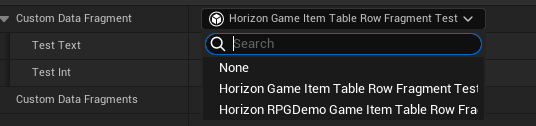
實際在DataTable中使用起來的體驗如下圖,我們可以自由選到所有繼承自BaseFragment的struct,裡面對應可編輯的欄位也會動態反射顯示出來:
接著可以用以下方法拿出我們所定義的Fragment:
bool UMyDemoLibrary::GetItemFragment(const FInstancedStruct& InInstancedStruct, FHorizonGameItemTableRowFragment_Test& OutFragment)
{
    bool bResult = false;
    const auto pFragment = InInstancedStruct.GetPtr<FHorizonGameItemTableRowFragment_Test>();
    if(pFragment)
    {
        OutFragment = *pFragment;
        bResult = true;
    }
    return bResult;
}

FHorizonGameItemTableRowFragment_Test fragment;
bool bHasFragment = GetItemFragment(InInstancedStruct, fragment);
if(bHasFragment)
{
	fragment.TestText;
	fragment.TestInt;
}
不過這方法的缺點是,相關的擴充功能只能在C++中進行,因為我們無法用BP去剛剛宣告出來的BaseFragment。
使用UObject製作Fragment的例子
基本概念跟上面的例子差不多,只是我們需要換成使用UObject宣告BaseFragment,另外要記得UCLASS裡要加上DefaultToInstanced跟EditInlineNew。
UCLASS(DefaultToInstanced, EditInlineNew, Blueprintable, BlueprintType, Abstract)
class UHorizonGameItemDataAssetFragment : public UObject
{
    GENERATED_BODY()
};
宣告使用,可以在BP或DataAsset中宣告,這邊宣告在DataAsset中:
UCLASS(Blueprintable)
class HORIZONGAMEITEM_API UHorizonGameItemDataAsset : public UDataAsset
{
	GENERATED_BODY()
public:

	UPROPERTY(EditAnywhere, BlueprintReadOnly, Category = Display, Instanced)
	TObjectPtr<UHorizonGameItemDataAssetFragment> Fragment;
};
接著就可以繼承下來做資料的擴充
UCLASS()
class UHorizonGameItemDataAssetFragment_Test : public UHorizonGameItemDataAssetFragment
{
    GENERATED_BODY()
public:
    UPROPERTY(EditAnywhere, BlueprintReadWrite, Category = "Data")
    int32 TestInt = 0;

    UPROPERTY(EditAnywhere, BlueprintReadWrite, Category = "Data")
    FText TestText;
};
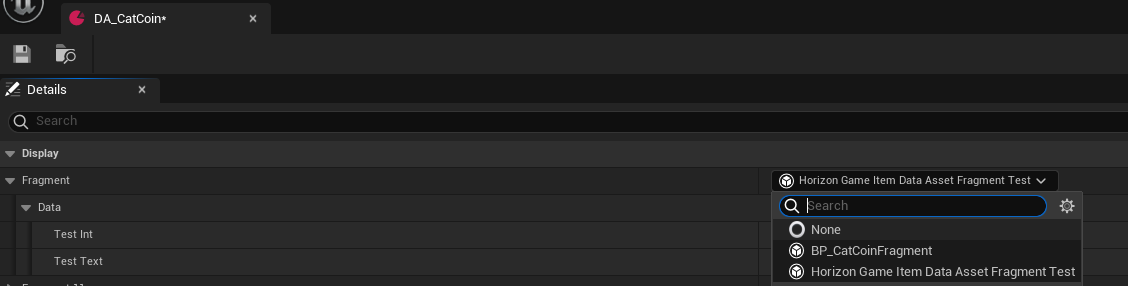
當我們把他宣告在DataAsset中時,就可以根據狀況選擇需要的Fragment,另外除了C++外,也可以純使用BP下來做欄位的擴充,裡面的可編輯欄位也能動態的反射顯示出來。
使用法方就是把DataAsset讀進來後,直接對Fragment做Cast就行:
 UHorizonGameItemDataAsset* pDataAsset = Cast<UHorizonGameItemDataAsset>(InSoftObjectPath.TryLoad());
 auto pFragment = Cast<UHorizonGameItemDataAssetFragment_Test>(pDataAsset->Fragment);
 if(pFragment)
 {
    pFragment->TestText;
    pFragment->TestInt;
 }
結論
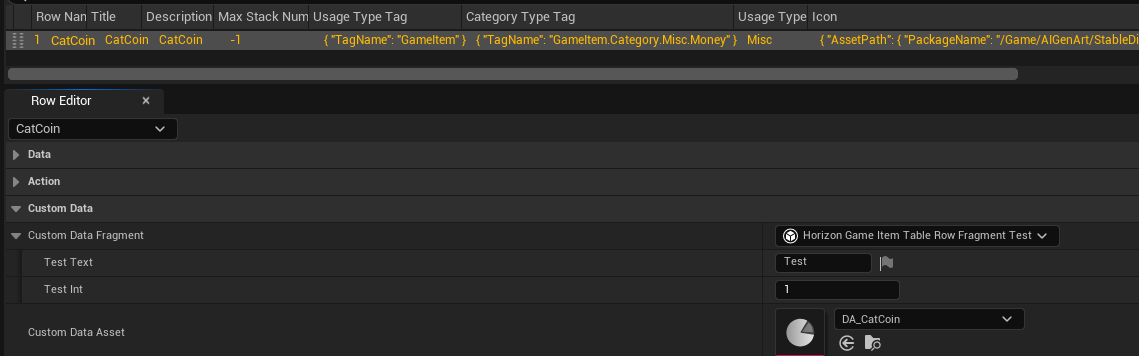
二種製作Fragment的方法各有優缺點,就資料擴充性而言由於InstanceStruct只能在C++中進行擴充,而UObject則可以同時在C++/BP中做,這讓UObject版本帶來某方面的優勢,然而,這方法的缺點是需要遊戲設計者另外製做出BP或DataAsset才能夠做資料的編輯,也就是說會多一個uasset,這在某些需要定義大量道具、武器裝備數據的應用是無法接受的;相反的InstanceStruct則可以很自然的作為TableRow的擴充嵌入DataTable。關於這點,我們可以看下圖,CustomDataFragment使用的是InstanceStruct方法,而CustomDataAsset則是使用UObject的方法,這個DataAsset中包含了Fragment的定義。
因此哪種方法比較好,可能要看遊戲的設計而決定。例如UE5導入的MassFramework,裡面的FMassFragment是基於InstanceStruct的設計;而在Unreal官方釋出的Lyra範例專案中,他的裝備系統是基於UObject Fragment方法的設計。另外若是多個TableRow需要「共用」參數的話,或許UObject Fragment也是個不錯的解決方案。我自己是在資料表中同時提供二種方式,讓使用者自行決定要使用哪種方式做擴充。
zoritoler imol
Hello there, I discovered your site by way of Google even as looking for a comparable subject, your web site got here up, it appears to be like good. I’ve bookmarked it in my google bookmarks.
residential lawn care
I think other web-site proprietors should take this website as an model, very clean and great user genial style and design, as well as the content. You’re an expert in this topic!
alexaslot138 rtp
Some really rattling work on behalf of the owner of this website , absolutely great subject matter.
burnblend
After study a few of the blog posts on your website now, and I truly like your way of blogging. I bookmarked it to my bookmark website list and will be checking back soon. Pls check out my web site as well and let me know what you think.
togel 4d
Pretty! This was a really wonderful post. Thank you for your provided information.
Gelatin Trick Recipe
I loved up to you’ll receive performed right here. The caricature is tasteful, your authored subject matter stylish. however, you command get got an shakiness over that you want be delivering the following. sick surely come further earlier once more as precisely the similar just about a lot ceaselessly within case you shield this increase.
Role of ethical hackers in network security
I’m impressed, I need to say. Actually not often do I encounter a blog that’s both educative and entertaining, and let me tell you, you have hit the nail on the head. Your concept is excellent; the issue is something that not enough people are talking intelligently about. I am very joyful that I stumbled throughout this in my search for one thing regarding this.
best slide out shelves
Greetings! This is my first visit to your blog! We are a team of volunteers and starting a new project in a community in the same niche. Your blog provided us beneficial information to work on. You have done a outstanding job!
fdertolmrtokev
Hi there would you mind letting me know which webhost you’re utilizing? I’ve loaded your blog in 3 different browsers and I must say this blog loads a lot faster then most. Can you suggest a good hosting provider at a honest price? Thanks, I appreciate it!
Renegade Home Alone Delta 9 THCP Rosin Gumdrops
I’m curious to find out what blog system you happen to be utilizing? I’m having some minor security issues with my latest site and I would like to find something more secure. Do you have any suggestions?
Javier Jacomet
Great blog! I am loving it!! Will come back again. I am bookmarking your feeds also
ayuda TFG arquitectura
I really like examining and I conceive this website got some really useful stuff on it! .
apartamento
F*ckin’ remarkable issues here. I’m very happy to peer your post. Thanks so much and i’m looking forward to contact you. Will you kindly drop me a mail?
casas en José Ignacio
It’s appropriate time to make a few plans for the long run and it is time to be happy. I have read this put up and if I may just I wish to counsel you few interesting issues or tips. Perhaps you could write subsequent articles relating to this article. I wish to read even more issues approximately it!
zabornatorilon
Usually I do not read post on blogs, however I would like to say that this write-up very pressured me to check out and do it! Your writing taste has been amazed me. Thanks, quite nice article.